Under the Stairs: My 2026 Homelab Tour
Published on January 2nd 2026For over 15 years, I have maintained some sort of "homelab." It has evolved from a single desktop to this current iteration, serving as my personal sandbox to learn, break, and occasionally fix things. My philosophy is simple. Reuse and repurpose. When I upgrade my gaming PC, the old parts don't get sold. They get a promotion to "Server" status. This cycle of upcycling has defined my setup for a decade and a half.
I am fully aware this setup won't be winning any design awards. It is a jumble of cables and blinking lights hiding in a closet. I close the door and pretend the cable management is perfect. However, I hope this shows what is possible with limited resources and a bit of stubbornness. Perhaps it will inspire you to find a new purpose for your own retired hardware.
The Homelab
Welcome to the nerve center. Yes, it lives in a utility closet under the stairs. Years ago, I wired the house with Ethernet, terminating everything here. It connects to a Gigabit switch, then the router, and finally the modem.
Despite looking like a bomb defusal scene, this closet powers my entire digital life. Media streaming, game servers, ad-blocking, backups, and home automation. It works so seamlessly that I often forget it is there until the internet goes out and the house goes quiet.
My workstations automatically mount NFS volumes and perform background backups, while a Raspberry Pi running Pi-hole silently protects every device from ads and malicious sites. It is a "set it and forget it" system that just works.
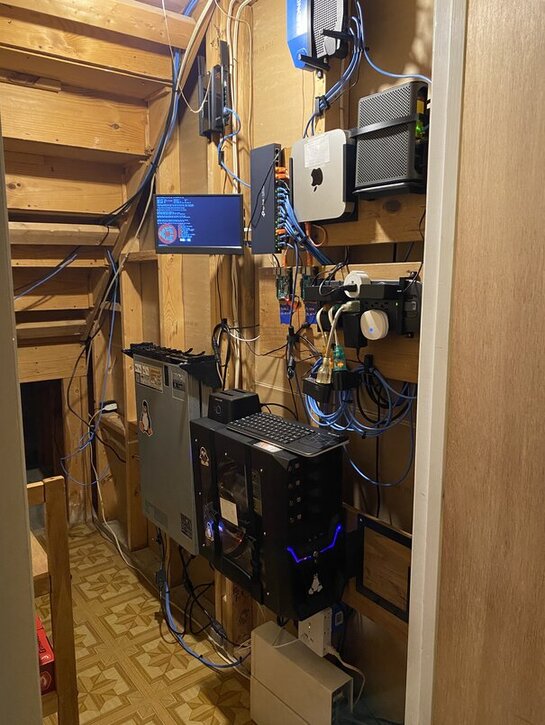
What Am I Looking At?
To save space, I avoided a massive server rack. The main server is wall-mounted using a standard "under-desk" PC mount. It houses components from my retired 2018 desktop, living inside a case I kept solely for its drive bays. It runs Ubuntu Server and handles everything from Plex to Docker containers. It even has a GTX 1080, mostly for transcoding.
To the left hangs a Dell PowerEdge R620. I rarely turn it on because it sounds like a jet engine preparing for takeoff. It is mostly there for me to learn enterprise hardware. I have it on a smart plug so I can shout "Alexa, turn on the server" and feel like a hacker.
Up top is a 2010 Mac Mini. In tech years, it is ancient. Yet, with 16GB of RAM and 2 500GB SSDs, it runs Proxmox and hosts VMs without complaining.
Two Raspberry Pi 3B+ units are mounted to the wall. One runs Pi-hole to block ads, and the other handles VPN duties for remote access to my home network. I keep them separate so that when I inevitably break the main server configuration, the internet remains intact while I figure out what happened.
Tucked away is an old router broadcasting a separate network for 2.4 Ghz IoT devices. It keeps my smart bulbs and questionable smart plugs isolated from my personal data and main network. They get internet access, but they don't get to talk to the main computers.
On the floor sit two UPS battery backups. They are definitely too small to keep things running through a long blackout, but they help with power blips and brownouts.
I have a small monitor on an arm for the rare occasion I need physical access. No fancy KVM switch here. I just move a wireless keyboard dongle around to each server. Since 99% of my work is done via SSH from the comfort of my desk, this manual approach works fine.
Finally, the supporting infrastructure like modems and power strips are organized using custom 3D-printed brackets. If it can be measured, it can be mounted.
Thoughts
I hope this look inside my messy server closet inspires you. You don't need thousands of dollars of enterprise gear. That old laptop with a broken screen or the desktop gathering dust in the garage is a perfect server waiting to happen. Spin up some Docker containers, break some configs, and learn something new.
Once your hardware is running, you can explore automations using cron jobs and Bash scripts. I even have some of my scripts send me a Discord notification when they run, or when they fail.
For more details on the specific services I run and how to configure them, check out my other posts on Cloudflare Tunnels, Playit.gg, and automatic backup strategies.